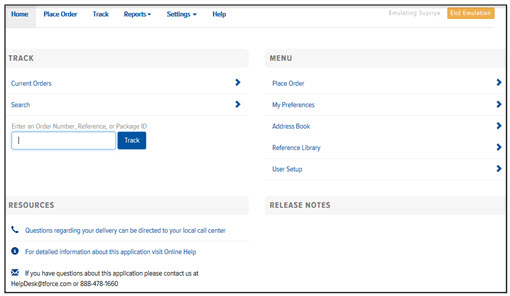
The Home page consists of the following sections:
Note: You may not have access to all features within Final Mile Track. Your System Administrator can enable/disable specific features for your User account.
Track – allows you to view orders scheduled for the current day, and search for orders that are scheduled for other days
Menu – allows you to place orders, set your preferences, add/edit/delete addresses, add/edit/delete references, and add/remove Users (if the “User Setup Access” option is enabled for the User on the User Setup page)
Resources – provides a link to your local call center, a link to the Final Mile Track application online help, and a link to the Support Services team
Release Notes – provides a link to the Release Notes for the current Final Mile Track release