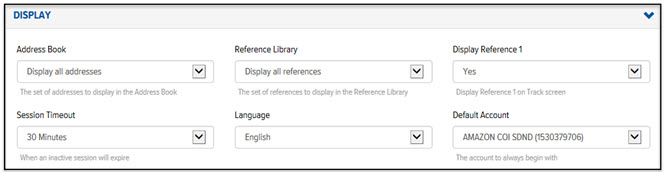
The settings in the Display section pertain to the display of information throughout the Final Mile Track application.
To define User Preferences for display:
On the My Preferences page, click Display. The Display section displays, as shown:
In the Address Book field, click the drop-down arrow, and select one of the following options:
· Display all Addresses – displays all addresses
· Display Only My Addresses – displays only the addresses that you have created
In the Reference Library field, click the drop-down arrow, and select one of the following options:
· Display all References – displays all references
· Display Only My References – displays only the references that you have created
In the Display Reference 1 field, click the drop-down arrow and select one of the following options:
· Yes – Displays Reference 1 in the header for each order on the Track page
· No – Reference 1 does not display on the Track page
In the Session Timeout field, click the drop-down arrow, and select the amount of time (30 minutes, 1, 2, 4, or 8 hours) that a session can be inactive before the User is required to log in again.
In the Language field, click the drop-down arrow, and select English or French.
In the Default Account field, click the drop-down arrow, and select the account that you want to display as the default on all Final Mile Track pages.
